Roomie Remote vs. SofaBaton X2, X1S & U3

Better than a SofaBaton. And you already own it.

A $130 to $380 button remote with a two-inch screen can't do what the iPhone, iPad, Mac, and Apple Watch in your home already do: a real keyboard, long press, and gestures on the Apple TV, live playback you can scrub, your movie library with posters, your cameras, Grok Voice, and every room in the house.

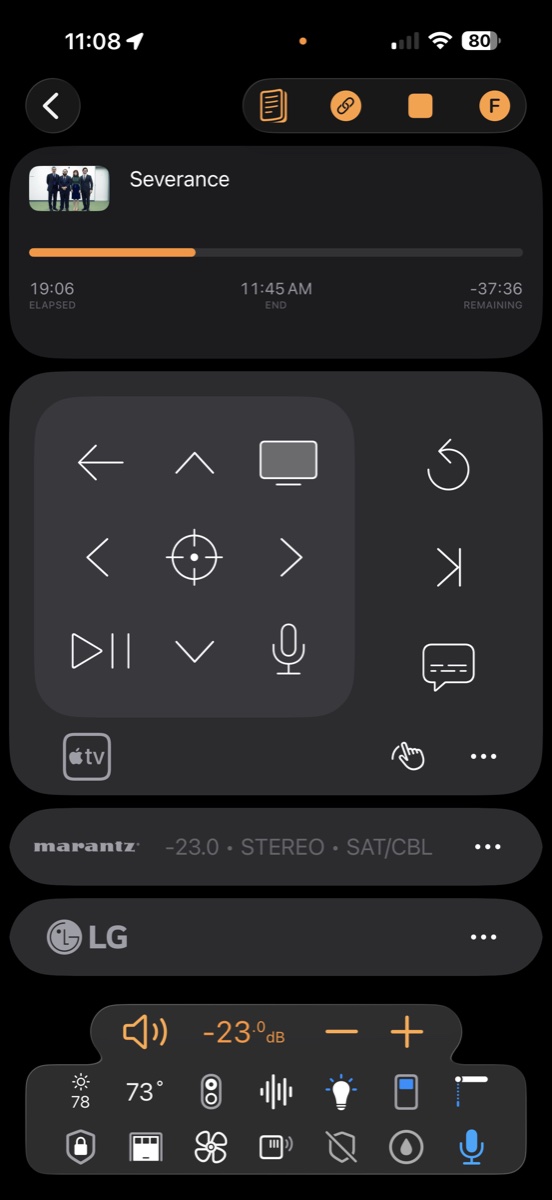
Roomie Remote on iPhone controlling an Apple TV: live playback position, directional pad with Siri button, and the receiver's volume and input
iPhone · 6.9″
SofaBaton X2 · 2.4″
Screens drawn to scale by diagonal: an iPhone Pro Max running Roomie (6.9″) beside the SofaBaton X2's touchscreen (2.4″), its largest. The remote's outline is illustrative.

Where a button remote stops

What a 2.4-inch screen will never do.

Roomie has the whole of Apple's platforms behind it: a big touch screen, the network, your Watch, your Lock Screen, and Grok Voice. That's not a nicer remote. It's a different class of thing.

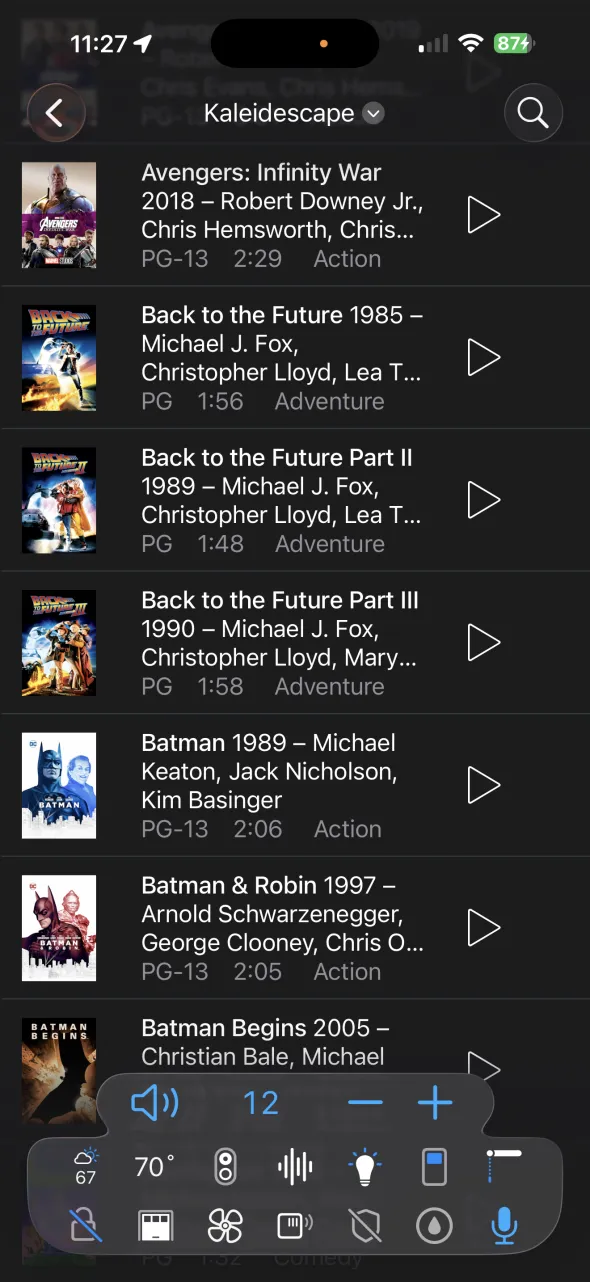
Roomie's Media Guide on iPhone listing a Kaleidescape movie library with posters: Avengers: Infinity War, the Back to the Future trilogy, Batman, Batman & Robin, and Batman Begins, each with year, cast, rating, running time, genre, and a play button

Your movie library, with posters.

The Media Guide puts your whole collection in your hand: Kaleidescape, Plex, Kodi, and Zidoo, with artwork, year, cast, rating, and running time. Tap play and the film starts in the theater, or jump straight to a favorite scene.

On a button remote, a movie library is a concept that doesn't exist. You navigate the TV's menus with arrows, one tile at a time.

Keyboard, long press, and gestures

Type searches on your iPhone's keyboard, long-press any button, swipe like the touchpad, and launch any Apple TV app by name. Hold to talk to Siri on the Apple TV, too.

Live playback you can scrub

Artwork, title, and position stream back from the Apple TV as you watch. Drag to any point in the episode, with the receiver's real volume beside it.

Grok Voice

Talk to your house like a person: "dim the lights and play Stripes in the theater." Hands-free, conversational, and miles past any voice remote. Say "Hey Roomie" even with the app closed.

Cameras, lights, and HomeKit

Live cameras, Lutron, Hue, Sonos, Nest, and every Apple HomeKit accessory, on the same screen as movie night.

Every room, following you

Every iPhone, iPad, and Mac in the house is a remote for every room, and Beacon Ranging switches rooms as you walk between them.

"But I want buttons." You have them.

A hardware remote's one real trick is buttons you can find without looking. Your iPhone and Apple Watch already have them.

  • The iPhone's own volume buttons: they drive the room's receiver or TV while an Activity is open, by feel, in the dark.

  • Haptics and sounds: every press taps back, so you know it landed without looking.

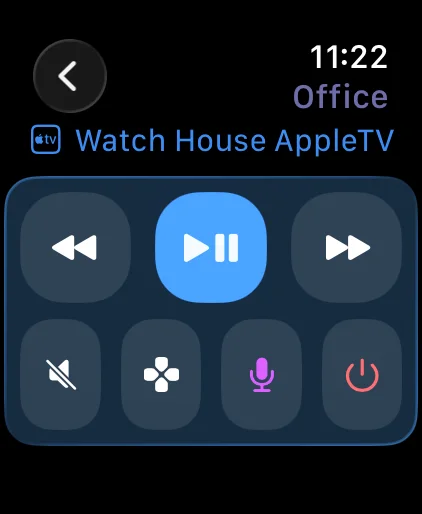
  • Apple Watch: transport, mute, a D-pad, power, and volume on the Digital Crown.

  • The iPhone's Action button, Lock Screen, and Control Center: start an Activity or turn the room off without opening the app.

  • Home Screen widgets and Siri: "Movie night with Roomie" from across the room.

  • A dedicated iPad on the coffee table: kiosk-style, always on, for guests and family.

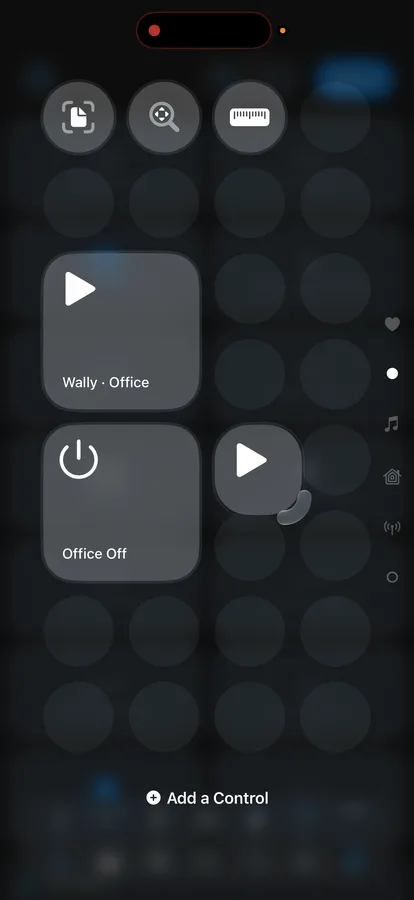
Roomie controls in iPhone Control Center: start an Activity in the Office, or turn the Office off Roomie on Apple Watch: transport, mute, and power buttons for the office Apple TV

Roomie vs. every SofaBaton, side by side

SofaBaton's three current remotes against Roomie on the Apple devices you already have. SofaBaton figures are its own published specs and prices, or independent reviews where noted.

Capability Roomie RemoteiPhone · iPad · Mac · Watch SofaBaton X2Flagship SofaBaton X1SMid-range SofaBaton U3Entry, May 2026
Price $49.99/yrOne Room · one smart TV free $350–380 $180–200 $130–140
Hardware to buy Noneoptional IR adapter for IR gear Remote + hub + dock Remote + hub Remote + dock
Screen Your iPhone, iPad, or Mac 2.4″ touch 2.0″ 2.4″
How it reaches the Apple TV Native IPyour network, no hub Bluetooth Bluetooth Bluetooth
Siri on the Apple TV Yeshold to talk No No NoGoogle voice only
Keyboard text entry on Apple TV Yesreal keyboard Noreviewers: keep Apple's remote Noreviewers: keep Apple's remote No
Long press & touchpad gestures on Apple TV Yesevery button Noreviewers: keep Apple's remote for the touchpad Noreviewers: keep Apple's remote for gestures No
Live Now Playing with drag-to-scrub Yes No No No
Movie library with posters (Kaleidescape, Plex, Kodi, Zidoo) Yesjump to a scene No No No
One-touch Activities Yes Yes Yes Macros only
Network (IP) control Deepreceivers, TVs, players, lighting Some brandsHue, Roku, Sonos, Govee, LIFX via hub A few brandsRoku, Hue, Sonos via hub No
Apple HomeKit Yes No No No
Live cameras Yes No No No
Voice Grok Voiceplus Siri & Alexa Skill Alexa / Googlevia a smart speaker Alexa / Googlevia a smart speaker Google voice
Automations Yesschedules, triggers, Shortcuts Via Home Assistant Basic No
Rooms Every roomon every family device One remote per room One remote per room One remote per room
Apple Watch, Lock Screen & Action button Yes No No No
Charging Nothing extraruns on devices you charge anyway 8–13 daysin CarPlayLife's testing 2–4 weeksSofaBaton's own FAQ About 2 weeksSofaBaton's model guide

SofaBaton, X1S, X2, U3, Apple TV, Siri, and HomeKit are trademarks of their respective owners and are referenced here for comparison only. SofaBaton prices and specs are from sofabaton.com as of October 2026. Reviewer findings: CarPlayLife (X2), CarPlayLife (X1S), Home Theater Forum (X2), HomeTechHacker (X1S). Battery figures: CarPlayLife's X2 testing, and SofaBaton's X1S FAQ and model guide.

Do the math for your whole house.

A SofaBaton is one remote for one room. Roomie is one subscription for every room and every Apple device your family owns.

A family room, a theater, and a bedroom with SofaBaton X2

$1,050 +

Three remotes at $350 each, three docks to keep them charged, no Siri on any of the Apple TVs, and the Siri Remotes stay in each room.

The same three rooms with Roomie Unlimited

$129.99 a year

Every room and device, on every iPhone, iPad, Mac, and Apple Watch in the family with Family Sharing. Nothing to buy or charge. One room is $49.99 a year, and you can control one smart TV free.

Running in an afternoon.

  1. 1

    Download and discover

    Roomie scans your network and finds the Apple TV, receiver, TV, and smart home gear on its own. No hub, no line of sight.

  2. 2

    No infrared needed, mostly

    Almost everything made in the last ten years connects over your network, so most homes never need infrared. Older IR-only gear joins through a Roomie IR100 adapter, with codes from a 400,000-command library.

  3. 3

    Build your Activities

    "Watch Apple TV" powers the room, sets the inputs, and dims the lights in one tap, synced to every device in the house.

Check whether your equipment is supported

SofaBaton owners ask…

What is the best SofaBaton alternative?

Roomie Remote. It turns the iPhone, iPad, Mac, and Apple Watch you already own into a universal remote for every room, with one-touch Activities, plus everything a button remote can't do: a real keyboard, long press, and gestures on the Apple TV, Grok Voice, live playback you can scrub, a Media Guide for Kaleidescape, Plex, Kodi, and Zidoo, live cameras, and Apple HomeKit.

Does SofaBaton work with Apple TV?

Only partly. It connects over Bluetooth for navigation and playback, but there's no Siri, no keyboard, and no touchpad gestures, and reviewers note owners still need Apple's remote to type passwords and use the touchpad. Roomie controls the Apple TV over your network with a real keyboard, long press, gestures, app launching, live Now Playing, and hold-to-talk Siri.

Is Roomie cheaper than a SofaBaton?

Yes, by a wide margin. For one room, Roomie One Room is $49.99 a year: an X2 at $350 buys you seven years of Roomie, and even the $180 X1S buys more than three, with nothing to charge. For a whole house, a SofaBaton is one remote per room at $130 to $380 each, while Roomie Unlimited is $129.99 a year for every room and every Apple device in the family. And you can control one smart TV free.

I like physical buttons. Is an app really better?

You don't give them up. The iPhone's own volume buttons drive the room's receiver or TV while an Activity is open, every press taps back with haptics and sound, and the Apple Watch puts volume on the Digital Crown. The Action button, Lock Screen, and Control Center start movie night or turn the room off without unlocking anything. And when you need more than buttons, like finding a movie or a camera, the whole screen is there.

Do I need a hub or other hardware for Roomie?

No. Roomie controls the Apple TV and almost everything made in the last ten years over your network, with no hub and no line of sight. Only older infrared-only devices need a Roomie IR100 adapter.

Roomie Remote X app icon

Put the SofaBaton money back in your pocket.

Download Roomie Remote free and run the Apple TV, the receiver, the lights, and every room from the Apple devices you already carry.