Most dead or flaky Siri Remotes come back with a charge, a fresh pairing, or a restart. These are Apple's own fixes, in the order that solves the most problems fastest. If the remote is lost or keeps failing, your iPhone can take over while you sort it out.
Works up close, cuts out across the room
Weak Bluetooth signal, often a closed cabinet
Steps 2 and 6Try each step, then test the remote before moving to the next. Most remotes are working again by step 3.
Plug the remote in for at least 30 minutes. Current Siri Remotes charge over USB-C; earlier ones use Lightning. A remote that's completely flat can look broken for the first few minutes on the cable. On the Apple TV, the remote's battery level is in Settings › Remotes and Devices.
Hold the remote close to the Apple TV. Press and hold Back (or Menu on older remotes) and Volume Up for five seconds, then follow any prompt on the TV. If it won't pair, unplug the Apple TV, wait six seconds, plug it back in, and try again.
Press and hold TV / Control Center and Volume Down for about five seconds, until the status light on the Apple TV turns off and on again. Let go, wait five to ten seconds, then press any button. A Remote Connected message on the TV means it worked.
Unplug the Apple TV from power, wait six seconds, and plug it back in. When the home screen is back, pair the remote again (step 2). This clears most cases where the box, not the remote, has stopped listening.
If everything but volume works, restart the remote first (step 3). Then open Settings › Remotes and Devices › Volume Control and choose your TV or receiver directly, for example TV via IR instead of Auto. Volume over HDMI-CEC depends on the TV and receiver cooperating, and that's the part that most often fails.
The Siri Remote talks to the Apple TV over Bluetooth, so a closed cabinet, a metal shelf, or a box tucked behind the TV can weaken it. On tvOS 18 or later, Settings shows the remote's signal strength. Move the Apple TV into the open and test again.
If none of this brings it back, the remote may be faulty. Apple can service it, or sell you a replacement. Before you buy one, read the next section: you may not need a remote at all.
Steps follow Apple's guidance in If your Siri Remote or Apple TV Remote isn't working and If the volume buttons on your Apple TV remote aren't working.
Your iPhone already has an Apple TV remote built in. Open Control Center and tap the remote button. If it isn't there, add the Apple TV Remote control to Control Center. It's free, it pairs over your Wi-Fi with a code on the TV, and for an Apple TV on its own it's all you need.
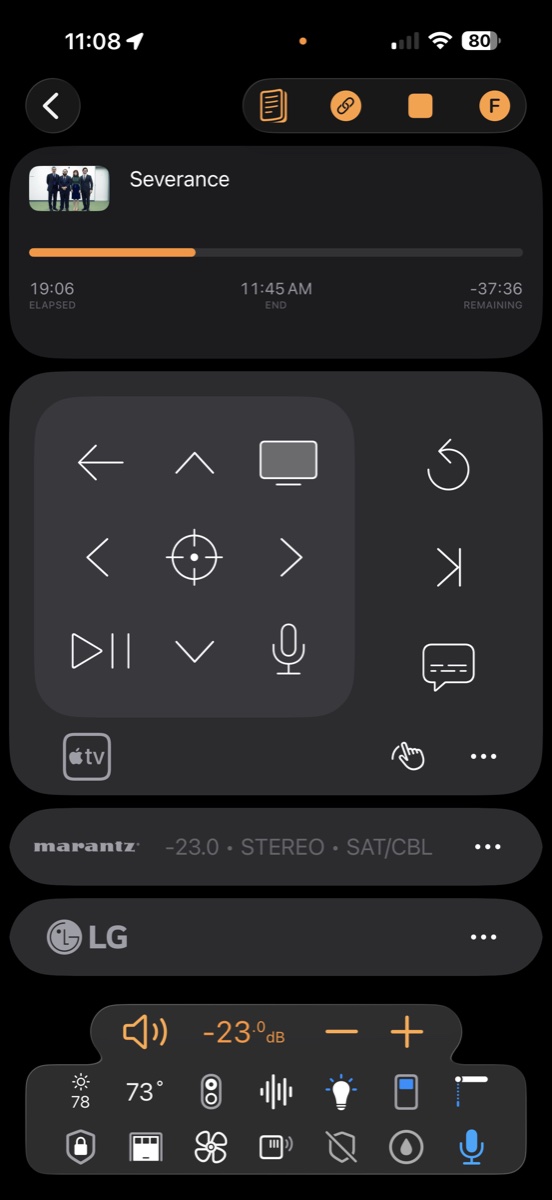
The built-in remote stops at the Apple TV. Roomie Remote turns your iPhone, iPad, Mac, and Apple Watch into the remote for the whole room, and it reaches the Apple TV over your network instead of Bluetooth.
Nothing to charge, pair, or lose. It runs on the devices already in your pocket and on your wrist, with volume on the Apple Watch's Digital Crown.
No line of sight, no Bluetooth range. Control the Apple TV from the kitchen, or with it shut in a cabinet.
Buttons when you want them. Start movie night or turn the room off from the Lock Screen, Control Center, or the iPhone's Action button, without opening the app.
The whole room comes along. Real receiver volume and inputs, the projector, the lights, with live Now Playing you can scrub and hold-to-talk Siri for the Apple TV.
Most hardware universal remotes reach the Apple TV the same way the Siri Remote does: over Bluetooth. SofaBaton's X1S and X2 pair with the Apple TV as a Bluetooth device, so the pairing and range problems on this page come along, plus a hub to place and a remote to recharge. Reviewers report Bluetooth drops that need re-pairing, and one tester measured the X2's battery at 8 to 13 days.
They also don't fully replace the Siri Remote. None of SofaBaton's remotes supports Siri on the Apple TV, and reviewers note you'll still reach for Apple's remote to type a password or use the touchpad. At $130 to $380, that's a second remote, not a replacement. Roomie gives you hold-to-talk Siri, a real keyboard, and network control from your iPhone, so the Siri Remote can actually go in the drawer.Sources: CarPlayLife X2 review, CarPlayLife X1S review, Home Theater Forum X2 review, and SofaBaton's published prices, October 2026.
Usually one of four things: the battery is flat, the remote has lost its Bluetooth pairing, the Apple TV needs a restart, or (if only volume fails) the volume setting is pointed at the wrong device. Charge it, pair it again by holding Back and Volume Up for five seconds, then restart the remote and the Apple TV if needed.
Press and hold the TV / Control Center button and Volume Down for about five seconds, until the Apple TV's status light turns off and on. Release, wait five to ten seconds, and press any button. If it still won't respond, pair it again by holding Back (or Menu) and Volume Up for five seconds near the Apple TV.
The Siri Remote controls volume through your TV or receiver, usually over HDMI-CEC, and that link is often the part that fails. Restart the remote, then in Settings › Remotes and Devices › Volume Control choose your TV or receiver directly, for example TV via IR instead of Auto.
Yes. Open Control Center on your iPhone or iPad and tap the Apple TV Remote button. It's free and works for the Apple TV on its own. To control the receiver, TV inputs, projector, and lights as well, use an app like Roomie Remote, which reaches the Apple TV over your network and runs on iPhone, iPad, Mac, and Apple Watch.
Try the fixes on this page first. If the remote is truly dead, a replacement Siri Remote works only with the Apple TV. Hardware universal remotes such as SofaBaton's also reach the Apple TV over Bluetooth and don't support Siri, so reviewers note you'll still keep Apple's remote for passwords and the touchpad. Roomie gives you Siri, a real keyboard, and the whole room from devices you already own. Compare the options.
Download Roomie Remote free and run the Apple TV, and the whole room around it, from the iPhone, iPad, Mac, and Apple Watch you already have.