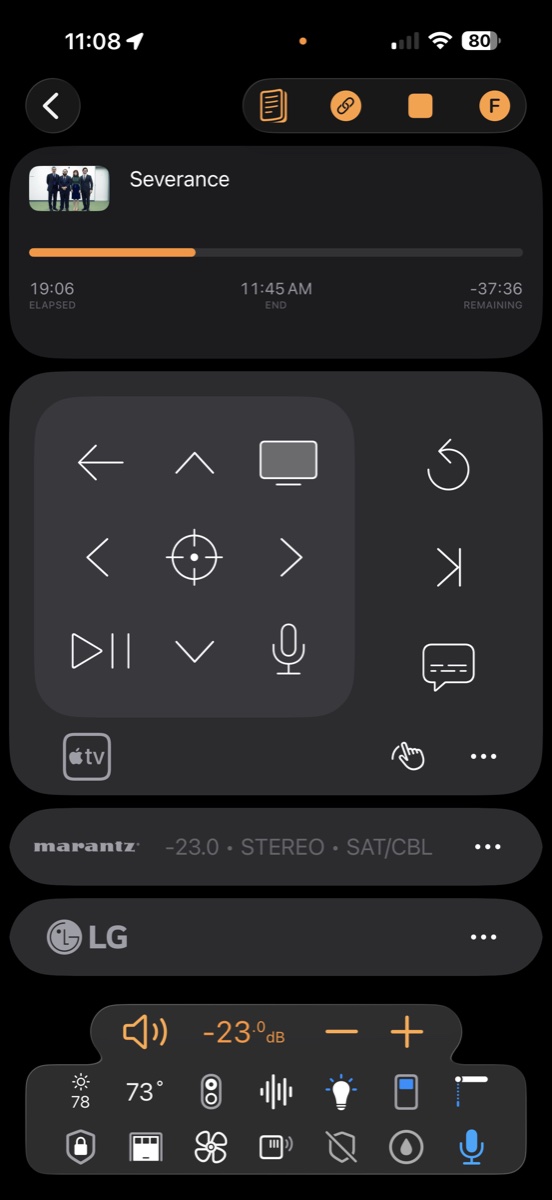
The best universal remote for Apple TV is already in your pocket.
Roomie Remote speaks the Apple TV's native network protocol. Full navigation, app launching, real keyboard search, hold-to-talk Siri, and the long-press commands IR remotes can't send — with live Now Playing feedback you can scrub. And the receiver, display, and lights come along.
Native IP control·400,000+ device commands·200+ brands
The Siri Remote is in the box. The better one is on your iPhone.
The first new Apple TV in four years is mostly a faster chip, and Roomie supports it today. Add it like any Apple TV, and the iPhone, iPad, Mac, and Apple Watch you already own become a better remote than the one it ships with: a real keyboard, long press, gestures, and live Now Playing, with the receiver and lights alongside.
New Apple TV, same Siri Remote. Roomie adds Siri, a keyboard and every room, on the Apple TV you have now, too.
The gap
Where the Siri Remote stops
The Siri Remote is a beautiful controller for exactly one device. The moment your room holds a receiver, a soundbar, a projector, or a second source, you're juggling remotes again — the very problem a universal remote exists to solve.
One device
It controls the Apple TV — with no feedback about what's playing — and nothing else in the rack. Your receiver, TV inputs, and disc player are invisible to it.
One wire
Volume rides on HDMI-CEC. No input switching, no surround modes, no zones — and when CEC hiccups, as usual, even volume goes.
One room, barely
Lights, shades, cameras, and every other room in the house are out of reach. Movie night still needs three more apps.
Why Roomie
Deeper control than the remote in the box.
Roomie doesn't blast infrared at the front of the room and hope. It talks to the Apple TV the way Apple devices talk to each other — over the network, with feedback flowing back.
True IP control
Roomie speaks the Apple TV's native network protocol from your iPhone, iPad, or Mac. No hub in the rack, no line of sight — control from any room in the house.
Hold for Siri. Long-press anything.
Hold the mic to talk to the Apple TV, exactly like the Siri Remote. Every other button supports long press too — the press-and-hold actions IR remotes can't send.
Now Playing, live
Artwork, program name, and playback position stream back as you watch. Drag the slider to jump anywhere in the episode — no fast-forward crawl.
Script anything
Record voice commands and replay them in automations. Trigger Activities by time, motion, or Shortcuts — the Apple TV becomes programmable.
Live feedback
See exactly what's playing. Jump anywhere in it.
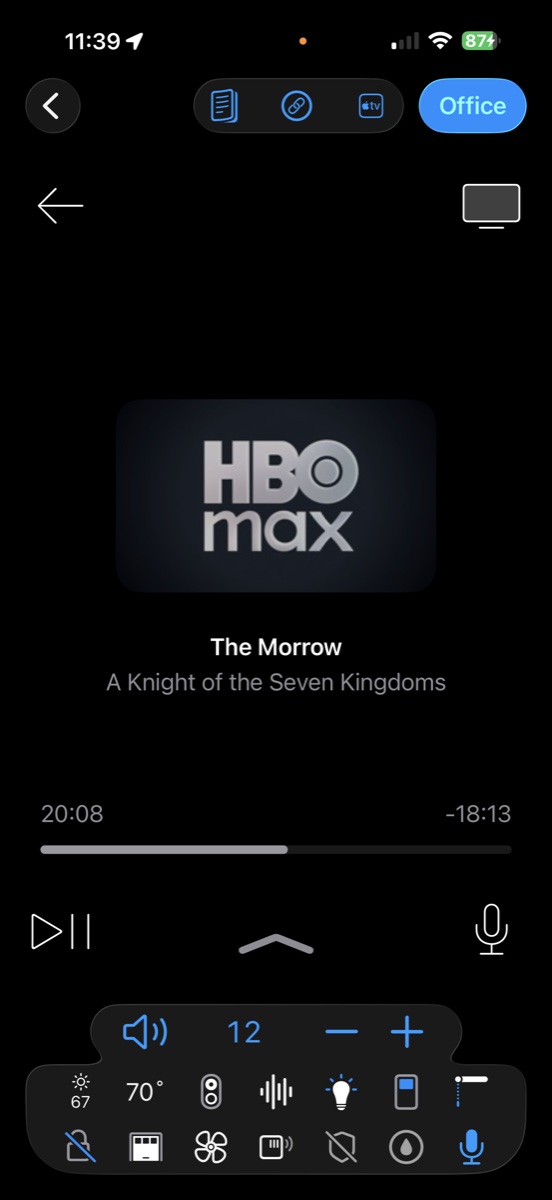
This is Roomie mid-episode: the app that's playing, the title, and a live position bar — 20:08 in, 18:13 to go — streamed back from the Apple TV as you watch. No other universal remote shows you this, because no other universal remote is listening.
Live artwork, program name, and elapsed & remaining time for the current show.
Drag the slider to reposition playback anywhere in the episode — or hold the mic and just ask Siri.
Launch any Apple TV app by name, type searches on a real keyboard, and run the room's volume beside it.
Only possible over IP
Browse the Apple TV. Tap, and it plays.
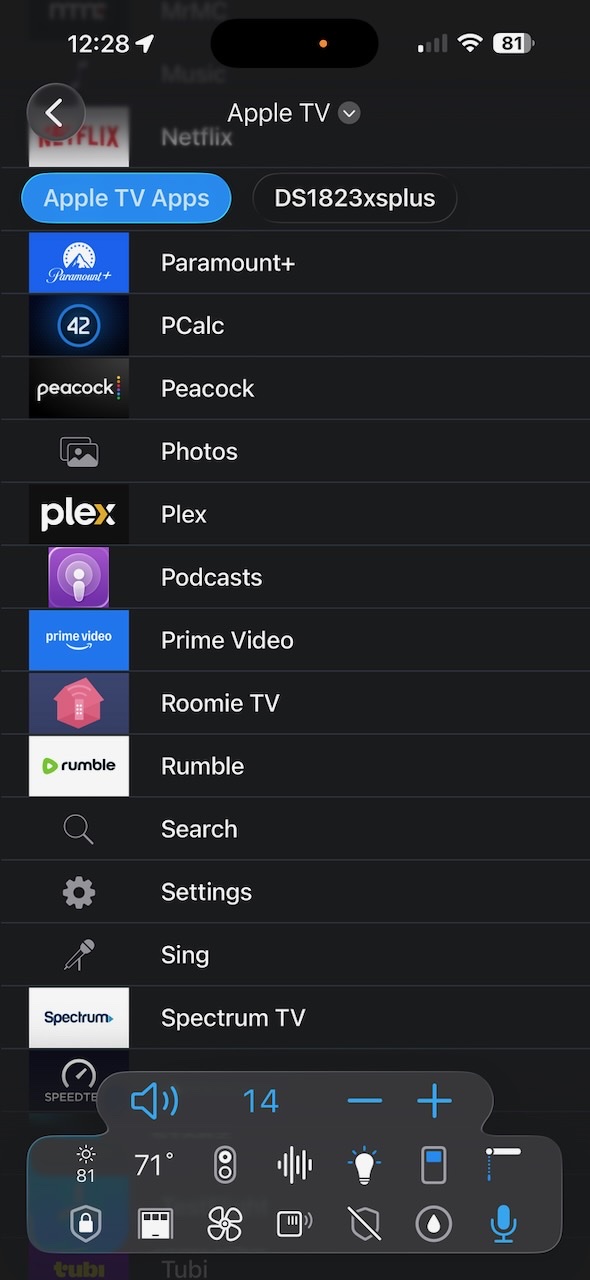
Roomie's Media Guide pulls the Apple TV's own app directory into the remote — every installed app, listed with its icon. Tap Netflix, and Netflix opens on the TV. And with Plex, Roomie goes a level deeper: browse your entire library in the guide, pick a movie, and it starts playing in the Apple TV's Plex app.
The Apple TV's installed apps, live in Roomie's Media Guide — tap to launch on the TV.
Browse your Plex library from the remote; selecting a title plays it in the Apple TV Plex app.
Both are IP-control features — an IR remote or Bluetooth hub can't see inside the Apple TV at all.
Roomie vs. SofaBaton
A $350 remote that still needs the Siri Remote.
SofaBaton advertises its X1S and X2 as the universal remote for Apple TV 4K. But for the Apple TV itself, they talk the same Bluetooth the Siri Remote does, and do less with it: no Siri, no keyboard, no touchpad gestures.
What Apple TV owners actually choose between — the remote in the box, Apple's built-in Remote app, a hardware universal remote, and Roomie. Competitor figures are manufacturer-stated.
Capability
Roomie RemoteApp · iPhone / iPad / Mac
Siri RemoteIn the box
Apple TV Remote appBuilt into iOS
SofaBatonX2 · X1S · U3 hardware
Controls the Apple TV
Yesincl. app launching
Yes
Yes
Basicvia Bluetooth
Apple TV control method
Native IPno hub, no line of sight
Bluetooth
Apple's protocol
Bluetoothno IP control of the Apple TV
Siri voice control
Yeshold to talk
Yesmic button
Yes
Nono model supports Siri
Long-press commands
Yesevery button
Yes
Yes
Not documented
Live Now Playing with drag-to-scrub
Yesartwork · title · position
No
Basic
No
Browse & launch installed apps
Yesin the Media Guide
No
App list
No
Browse Plex, play on the Apple TV
Yes
No
No
No
TV & receiver input switching
YesIP · IR · Serial
NoCEC volume only
No
YesIR, no feedback
Device / command library
400,000+200+ brands, growing
Apple TV only
Apple TV only
500,000+ claimedmostly infrared
One-touch Activities / macros
Yes
No
No
YesX1S, X2
Automations & scripting
Yesrecord & replay voice commands
No
No
LimitedX2 via Home Assistant
Smart home (Lutron, Hue, Sonos, Nest)
Yes
No
No
LimitedHue, Sonos & more via X2/X1S hub
Apple HomeKit
Yes
No
No
No
Multi-room control
Yesevery room, synced
One Apple TV
One at a time
One remote per room
Text entry with a keyboard
Yes
On-screen grid
Yes
Noreviewers: keep Apple's remote
Control from anywhere
Yessecure, no VPN needed
No
No
No
Price
Free to startsubscriptions from $4.99/mo
Included
Free
$130–380U3 · X1S · X2
Apple TV, Siri Remote, and SofaBaton are trademarks of their respective owners and are referenced here for comparison only. Competitor capabilities are based on publicly available manufacturer information as of 2026.
The honest answer
When is the Siri Remote enough?
If your entire setup is an Apple TV plugged straight into a TV whose CEC behaves, the remote in the box is genuinely all you need. We'd tell you to keep it and spend nothing.
A universal remote earns its place the day the room grows: a receiver or soundbar with inputs to switch, a projector with its own power sequence, a game console, a cable box, lighting you want dimmed when playback starts. That's the setup Roomie was built for.
Two or more devices in the rack? Roomie switches every source and input the Siri Remote can't see.
Real volume control — receiver decibels over IP, not CEC guesswork.
Lights, shades, and cameras woven into the same screen as playback.
Every room in the house — not one Apple TV at a time.
Getting started
On your TV in three steps.
1
Download the app
Get Roomie from the App Store on your iPhone, iPad, or Mac. One subscription covers every device, with Family Sharing.
2
Auto-discover the room
Roomie scans your network and finds the Apple TV, receiver, TV, and smart home gear automatically. Legacy IR devices join via a Roomie IR adapter.
3
Build your Activities
"Watch Apple TV" powers the display, sets the input, and readies the room in one tap — from your phone, your iPad, or your Mac.
What is the best universal remote app for Apple TV?
Roomie Remote. It gives your iPhone, iPad, and Mac deep IP control of the Apple TV — full navigation, app launching, keyboard text entry, hold-to-talk Siri, long-press commands, and live Now Playing feedback you can scrub — plus control of the TVs, AV receivers, lighting, and Apple HomeKit accessories around it, with 400,000+ device commands across 200+ brands.
Can the Siri Remote control my soundbar or AV receiver?
Only volume, and only when HDMI-CEC cooperates. The Siri Remote can't switch receiver inputs, change surround modes, control zones, or drive any device that isn't the Apple TV. Roomie speaks IP, infrared, and serial directly to receivers from Denon, Marantz, Yamaha, Anthem, Sony, and more — full control, not just volume.
Can I use Siri on the Apple TV through Roomie?
Yes. Hold the microphone button in Roomie to talk to the Apple TV, just like holding the Siri button on the remote in the box. Roomie also sends long-press commands for the other buttons — select, arrows, play — which IR-based universal remotes can't express. You can even record voice commands and play them back automatically as part of an automation.
I lost my Apple TV remote — can Roomie replace it?
Yes. Roomie on iPhone, iPad, or Mac gives you full Apple TV control: navigation, playback, app launching, and text entry with a real keyboard. Many households keep Roomie as the everyday remote and leave the Siri Remote in a drawer.
Does Roomie work with the new Apple TV?
Yes, today. The new Apple TV is mostly a faster chip, and Roomie controls it just like earlier Apple TV 4K models, over your network from iPhone, iPad, Mac, and Apple Watch, with a real keyboard, long press, gestures, live Now Playing, and hold-to-talk Siri. It's a better remote than the Siri Remote in the box.
Is SofaBaton a good remote for Apple TV?
It's a well-made button remote, but for the Apple TV it does less than the Siri Remote: it connects over Bluetooth, supports no Siri, and reviewers note you'll still need Apple's remote for passwords and the touchpad. Roomie controls the Apple TV over your network with hold-to-talk Siri, keyboard text entry, app launching, and live Now Playing, plus the receiver, display, and lights. See the full comparison.
My Apple TV remote isn't working. What should I do?
Charge it for 30 minutes, then pair it again by holding Back (or Menu) and Volume Up for five seconds near the Apple TV. If that fails, restart the remote by holding TV / Control Center and Volume Down for five seconds, and restart the Apple TV by unplugging it for six seconds. Meanwhile, Roomie or the Remote in your iPhone's Control Center can run the Apple TV. All seven fixes, in order.
Do I need any extra hardware?
No. Roomie controls the Apple TV and most modern equipment over your network with no hardware at all. Only older infrared-only devices need an inexpensive Roomie IR adapter.
Is Roomie Remote free?
You can control one smart TV free with no subscription. Subscriptions unlock unlimited devices, rooms, and Activities, and one purchase covers Apple TV, iPhone, iPad, and Mac with Family Sharing.
Give your Apple TV the remote it deserves.
Download Roomie Remote free and control the Apple TV — and the whole room around it — from the devices you already carry.