 FilmVault
Movie collector for iPhone, iPad and Mac
FilmVault
Movie collector for iPhone, iPad and Mac
Bring your My Movies collection with you.
FilmVault imports a My Movies 6 export or a Blu-ray.com collection in minutes and keeps every disc, box set and digital copy under the right title, on iPhone, iPad and Mac. One purchase covers all three, and it never expires.

What happens when you stop paying
My Movies 6
Subscribe, or prepay for 24 months of service. Either way, when it lapses the app drops back to its free limit of 50 titles until you pay again.
FilmVault
Pay once and you’re done. Packs never expire, there’s nothing to renew, and one purchase covers your iPhone, iPad and Mac.
My Movies 6 terms from its App Store listing, US, October 2026.
Move in three steps.
-
Export your collection
From My Movies 6, export your collection as a CSV file (a ZIP containing it works too). From Blu-ray.com, export your collection list as CSV; DVD and Blu-ray/4K lists both import.
-
Import it into FilmVault
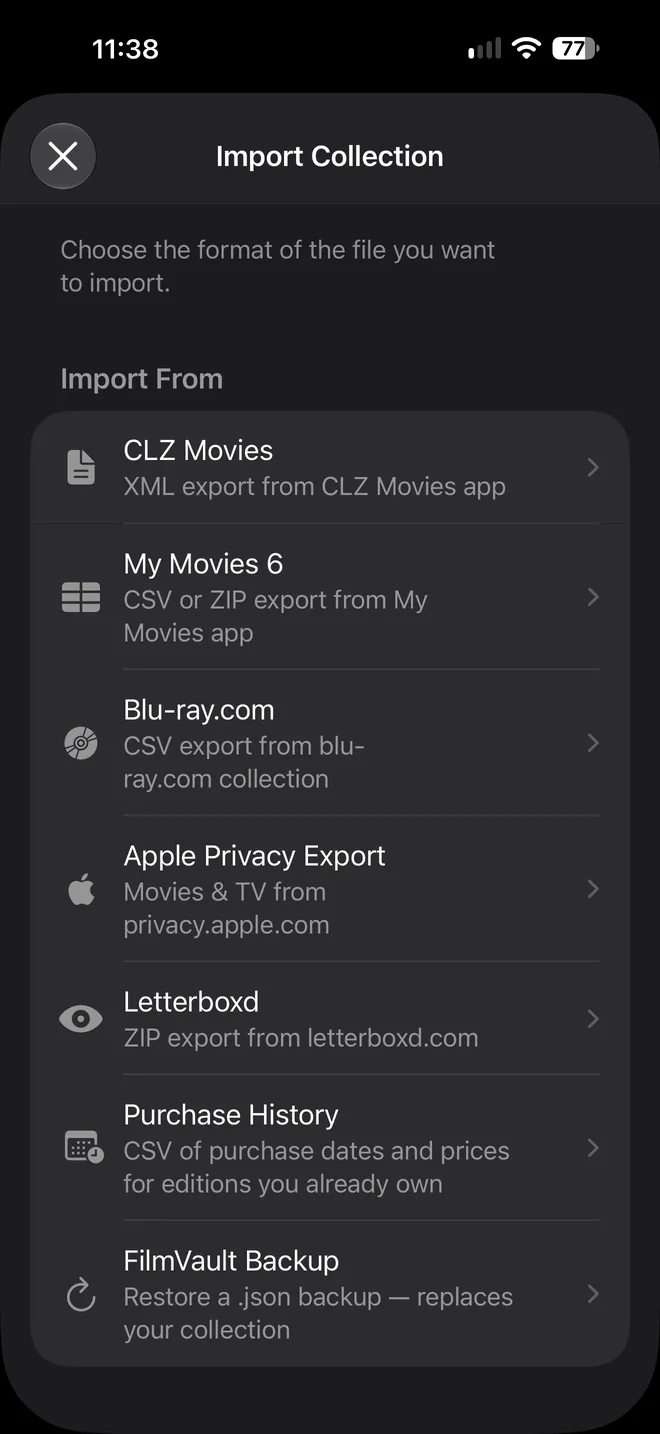
In FilmVault, open Import Collection and choose My Movies or Blu-ray.com. Importing is free, whatever the size of your collection.
-
Check the matches
Barcodes, formats, box sets and editions, watched status and disc details come across. Re-import any time; matches never create duplicates.
FilmVault also imports from CLZ Movies, Letterboxd and Apple’s privacy export, so a collection split across apps ends up in one place.
Side by side
| Feature | FilmVault | My Movies 6 |
|---|---|---|
| Price | $0 to start; $9.99 or $19.99 once, never expires | Subscription, or a 24-month plan bought up front; 50 titles when it lapses |
| One purchase covers | iPhone, iPad and Mac | iPhone and iPad; using it across platforms is a separate Premium plan ($24.99 or $49.99) |
| Mac | The same app, included | A separate app |
| Sign-in | Sign in with Apple: no password, and Hide My Email works | A My Movies account |
| Barcode scanning | Yes, with the camera on iPhone and iPad; Continuity Camera or a typed UPC on Mac | Yes |
| Kaleidescape, Kodi and Plex | Reads their libraries over your home network (Collector Pack) | No |
| Title data | TMDb, plus FilmVault’s curated disc catalog with high-quality cover scans and search across the text on each cover | Community disc database |
My Movies 6 details from its App Store listing, US, October 2026.
When to stay with My Movies
Stay with it if one of these is true for you.
- You also catalog on Windows or Android.
- Your collection lives in DVD Profiler or Delicious Library, which FilmVault doesn’t import yet.
Using the free My Movies by Blu-ray.com app instead? That’s a different app, tied to your Blu-ray.com account. FilmVault imports that collection too, from the CSV you can export on Blu-ray.com.
Questions
Which My Movies does FilmVault import from?
Both. FilmVault reads the CSV export from My Movies 6 (or a ZIP containing it), and the collection CSV you can export from Blu-ray.com, which is what the free My Movies by Blu-ray.com app uses.
Do box sets and multiple editions survive the import?
Yes. FilmVault keeps each film as one title with every edition you own beneath it, so a box set, a Steelbook and a digital copy of the same film don’t become duplicates.
Is FilmVault a subscription?
No. FilmVault is free to start, with full editing for your first 25 titles. The Starter Pack ($9.99, up to 500 titles) and Collector Pack ($19.99, unlimited titles, Kaleidescape, Kodi and Plex import, and sharing your library with up to five people) are one-time purchases.
Do I need an account?
Yes, but there’s nothing to set up: FilmVault uses Sign in with Apple, with no password to create, and Hide My Email works. Your account keeps your collection in sync across iPhone, iPad and Mac and restores it if you change devices.
Does FilmVault run on Windows or Android?
No. FilmVault is made for iPhone, iPad and Mac and needs iOS 26, iPadOS 26 or macOS 26 or later.
Is FilmVault available in my country?
FilmVault is on the App Store in the United States, Canada, the United Kingdom, Ireland, Australia and New Zealand.
Something else? Email support@filmvault.ai.
Import free. Decide later.
Bring your whole collection into FilmVault at no cost, look around, and buy a pack only if it’s the one you want to keep.
Download on the App Store