Direct IP control · live feedback in real decibels


The remote your Denon or Marantz deserves.

Roomie Remote speaks your receiver's own IP protocol — two-way, with live feedback. Real decibels, every input, surround modes, and zones, from iPhone, iPad, Mac, and Apple TV. And the rest of the room comes along: Sonos, HomeKit, Hue, Lutron, and the display itself.
Denon Marantz Sonos Lutron
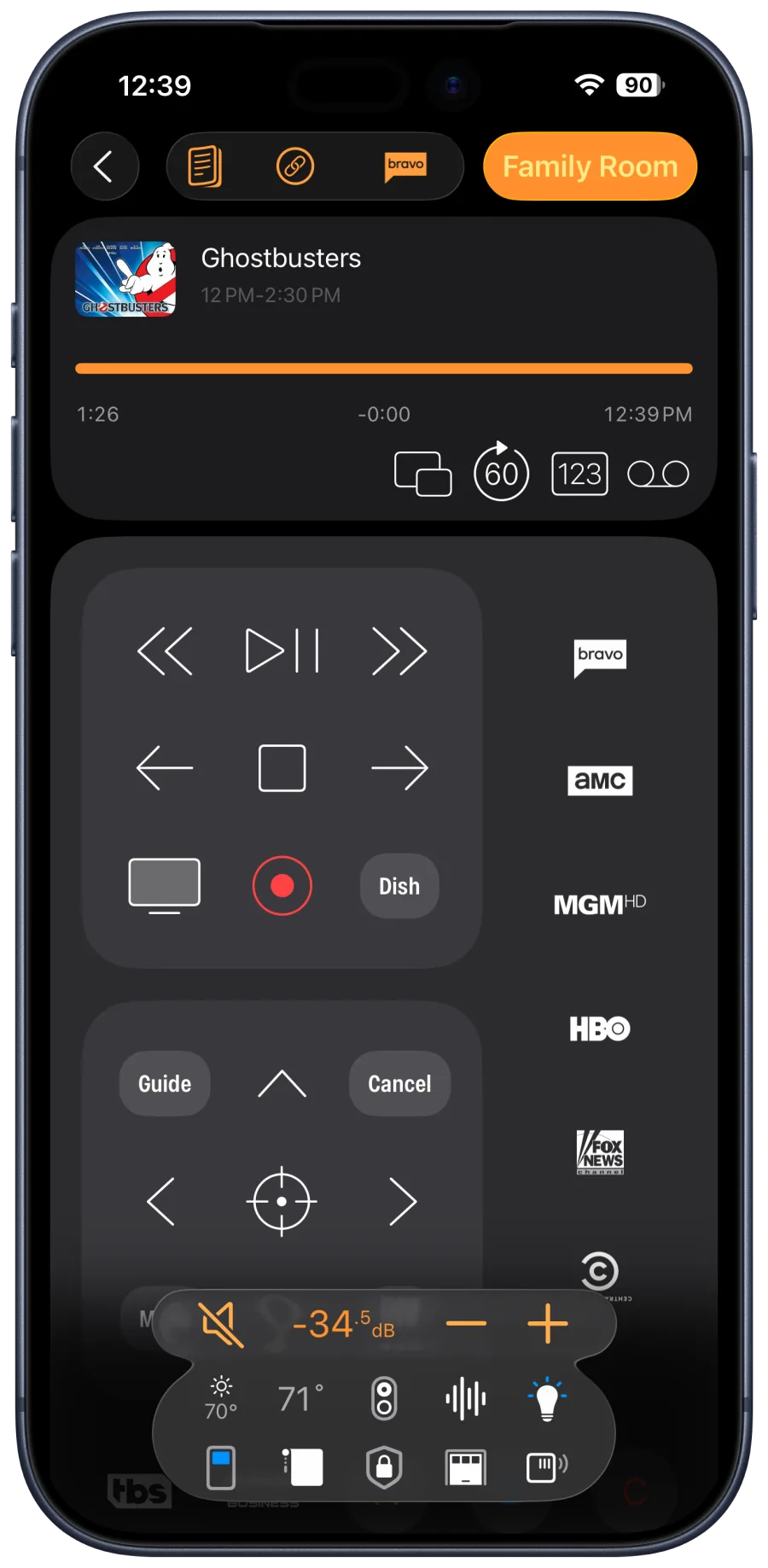
Roomie Remote on iPhone controlling a home theater: live playback, transport controls, channel favorites, and receiver volume shown in real decibels with lighting and climate in the same tray
Two-way control

Feedback, not guesswork

Roomie doesn't fire blind commands and hope. It holds a live, two-way conversation with your receiver over IP — what you see on screen is what the receiver is actually doing.

−34.5 dB

Real volume, live

The receiver's actual level in decibels, updating in real time on every device — not a blind IR nudge.

Zone 2

Every zone, independent

Separate source and volume for Zone 2 and Zone 3 — music on the patio while the theater runs a movie.

Pure Direct

Inputs & sound modes

Switch any input and surround mode by name — the settings that live three menus deep on the front panel.

The HomeKit gap

Denon and Marantz don't speak HomeKit.
Roomie speaks both.

Your receiver supports AirPlay 2, so Apple Home sees it as a speaker — and nothing more. No inputs, no surround modes, no zones. The usual workaround is running a Homebridge or Home Assistant server on hardware you maintain forever.

Roomie skips all of that. It controls the receiver natively over IP and brings your HomeKit accessories into the same app — so "Movie Night" can set the input, engage the right sound mode, and dim the HomeKit lights in one tap. No server, nothing to maintain.

  • Full receiver control — not the AirPlay-speaker sliver Apple Home offers.
  • HomeKit lights, shades, and thermostats in the same rooms and Activities as the receiver.
  • No Homebridge server — nothing to build, patch, or reboot at 11 PM on movie night.
  • Siri Shortcuts for the moments voice beats taps.
Beyond the receiver

Receiver apps stop at the receiver. Roomie runs the room.

The manufacturer's app and single-purpose receiver remotes do one job. Your evening isn't one job — it's the receiver and the display, the source, the Sonos in the kitchen, the lights, and the shades.

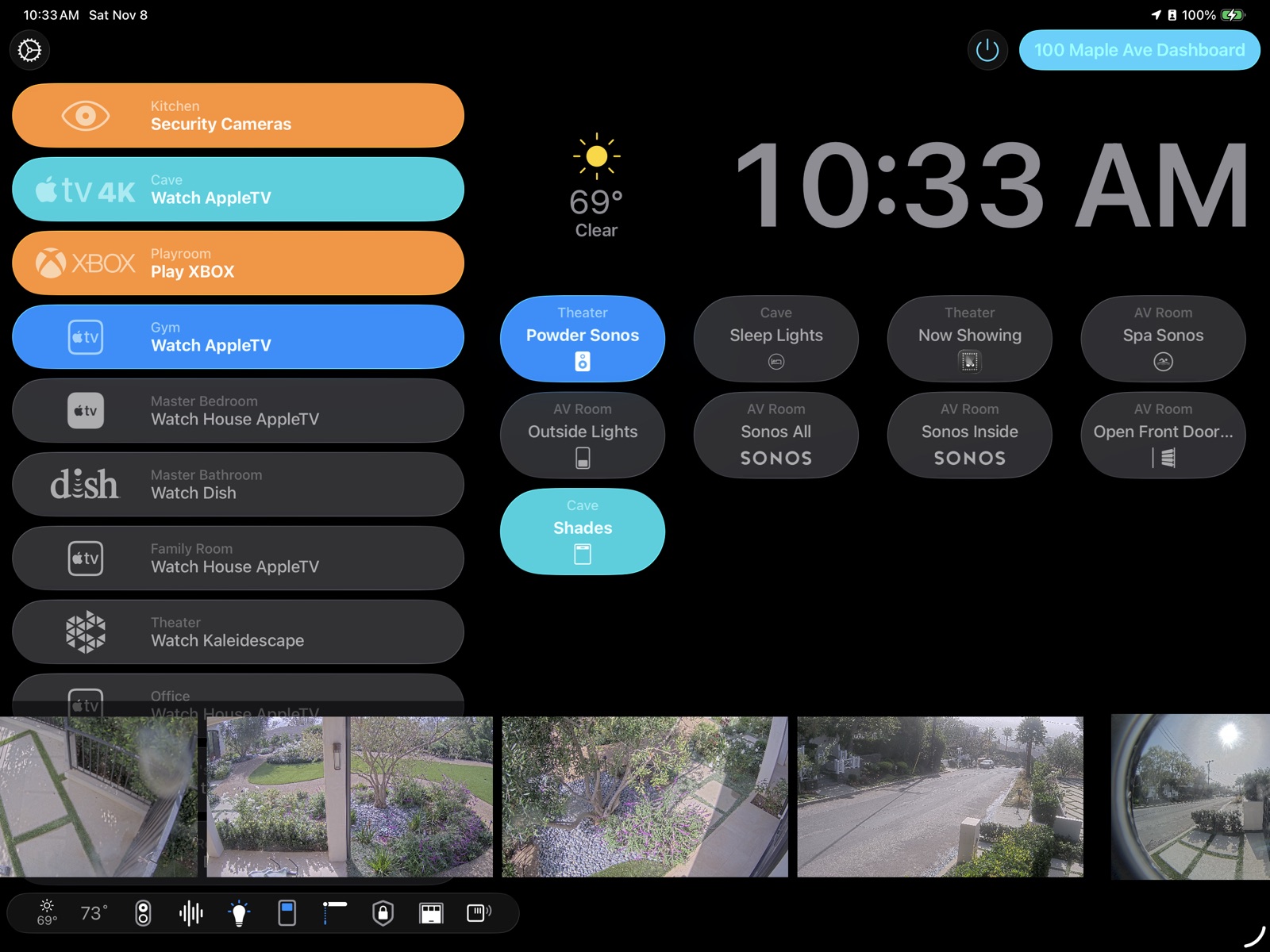
Roomie Remote dashboard on iPad: one-touch activities for every room, Sonos groups, security camera feeds, shades, lighting, and weather in a single view
One dashboard for the whole home — activities, Sonos, cameras, shades, and climate beside your receiver.
Honest comparison

Ways to control a Denon or Marantz from your iPhone

The receiver-only apps are genuinely good at receivers — that's the honest part. The difference is everything else in the room. Competitor capabilities are manufacturer-stated.

Capability Roomie Remote Universal remote app Manufacturer app Denon / Marantz AVR Remote Receiver-only apps e.g. DeRemote Homebridge + Apple Home DIY server
Volume in real dB, live feedback Yes Yes Yes Nospeaker volume only
Inputs & surround modes Yes Yes Yes Plugin-dependent
Multi-zone (Zone 2 / 3) Yes Yes Yes Plugin-dependent
Controls the TV, projector & sources too YesIP · IR · Serial No No More plugins
One-touch Activities across devices Yes No No DIY scenes
Sonos, Hue, Lutron, Nest in the same app Yes No No More plugins
Apple HomeKit accessories alongside Yes No No Yes
No server to build or maintain Yes Yes Yes Noalways-on box + updates
Older receivers without network control YesIR or serial adapter No No No
Native on iPhone, iPad, Mac & Apple TV Yes iPhone & iPad Varies Home app devices
Price Free to startsubscriptions from $4.99/mo Free Paid app Free + server hardware

Denon and Marantz are trademarks of Sound United / Masimo. DeRemote and Homebridge are products of their respective owners, referenced here for comparison only. Competitor capabilities are based on publicly available information as of 2026.

Getting started

Controlling your receiver in three steps.

1

Download & auto-discover

Open Roomie on any Apple device. Networked Denon and Marantz receivers appear automatically — no IP addresses to type.

2

Add the room around it

Bring in the TV or projector, sources, Sonos, lights, and shades. Older gear joins via a Roomie IR adapter or serial.

3

Build your Activities

"Movie Night" sets the receiver input and sound mode, powers the display, and dims the lights — one tap, every time.

Questions

Receiver owners ask…

What's the best app to control a Denon or Marantz receiver from iPhone?

Roomie Remote provides deep, two-way IP control — volume in real decibels with live feedback, input switching, surround modes, and multi-zone — and unlike receiver-only apps, it also controls the TV, projector, sources, Sonos, lighting, and Apple HomeKit accessories in the same app, on iPhone, iPad, Mac, and Apple TV.

Do Denon and Marantz receivers work with Apple HomeKit?

Not natively. They support AirPlay 2, so Apple Home sees them only as a speaker — no inputs, no surround modes, no zones. Roomie fills that gap with full two-way receiver control, and brings your HomeKit accessories into the same app and the same one-touch Activities. No Homebridge server to build or maintain.

Can I control Zone 2 or Zone 3?

Yes. Roomie controls receiver zones independently — separate source selection and volume for Zone 2 and Zone 3 — so the patio can play music while the living room runs a movie.

My receiver is older and not on the network. Can Roomie still control it?

Yes. Networked models are controlled directly over IP with nothing extra to buy. Older units without network control can be driven by infrared with a Roomie IR adapter, or over RS-232 serial via a supported serial adapter, using Roomie's 400,000+ command database.

Can the same app control my Sonos, lights, and Apple TV too?

Yes. Roomie controls Sonos, Philips Hue, Lutron, Nest, Apple TV, smart TVs, projectors, and Apple HomeKit accessories alongside your receiver — one Activity can set the input and sound mode, dim the lights, and start playback in a single tap.

Is Roomie Remote free?

You can control one smart TV free with no subscription. Subscriptions unlock unlimited devices, rooms, and Activities, and one purchase covers iPhone, iPad, Mac, and Apple TV with Family Sharing.

Roomie Remote X app icon

Your receiver has depths.
Reach them.

Download Roomie Remote free and give your Denon or Marantz — and the whole room around it — the control it was built for.